It is 9:14 PM on a Tuesday. A parent is asking your school about admission forms. A patient wants to know if your clinic opens on Saturday. A buyer on Instagram wants to confirm whether you deliver to Port Harcourt. Around ₦400,000 worth of enquiries is sitting in three inboxes, and the last human reply was 6:02 PM.
That is the gap an AI customer support chatbot for businesses is built to close — not by replacing your team, but by answering the questions your team answers fifty times a week, and by handing the serious conversations to a human with the full context already collected.
Most Nigerian business owners are not asking “should I get a chatbot?” any more. They are asking a sharper question: what should the bot handle, and where exactly does a human take over? Get that line wrong in either direction and you lose — automate too much and you get an overconfident robot promising discounts nobody authorised; automate too little and you have paid for a tool that sits there collecting dust.
This guide walks through that line properly: what is safe to automate, what must stay human, how each channel behaves differently, and how to launch in a way that reduces complaints instead of creating them.
(Still weighing the business case — cost versus hiring, where the bot should live? Start with our earlier guide on AI chatbots for Nigerian businesses, then come back here for the support-quality detail.)
The real support problem: customers want speed, your team is drowning
Repeated questions are the invisible tax on every growing Nigerian business.
A real estate firm fields the same four questions all day: is the property still available, what is the rent, when can I inspect, do you accept a two-year payment. A hotel gets “do you have a room for Saturday” twenty times, and three of those people book. A clinic answers “do you take HMO” and “what time do you close” so often that the front desk cannot finish registering the patient standing in front of them.
None of this is difficult work. That is exactly the problem. It is easy, endless, and it pulls your best people off the conversations that actually close money.
And speed decides outcomes. A prospect messaging three vendors on WhatsApp will usually go with whoever replied first and sounded like they knew what they were talking about. Not the cheapest. Not the best. The fastest to be useful. When your average first reply is three hours because everyone is in meetings or closed for the night, you are not losing on price — you are losing on response time, and you will never see those losses in a report because they never became a lead.
One more thing before we go further: a support chatbot is a front desk assistant, not your overconfident cousin with data bundles. A good front desk assistant knows the routine answers, knows who to transfer a difficult caller to, and knows when to say “let me get someone who handles this.” Everything below follows from that.
What an AI support chatbot should handle safely
Safe automation means one thing: high volume, low ambiguity, low consequence. If a wrong answer costs money, creates a legal exposure, or damages trust, it does not belong in the bot's mouth. If a wrong answer merely means the customer asks again, automate it and stop thinking about it.
1. FAQs with stable answers
Pricing ranges, business hours, location and directions, services offered, delivery timelines, requirements to apply, payment methods accepted, booking steps. These answers never change, they are already written down somewhere, and they account for most of your inbound volume.
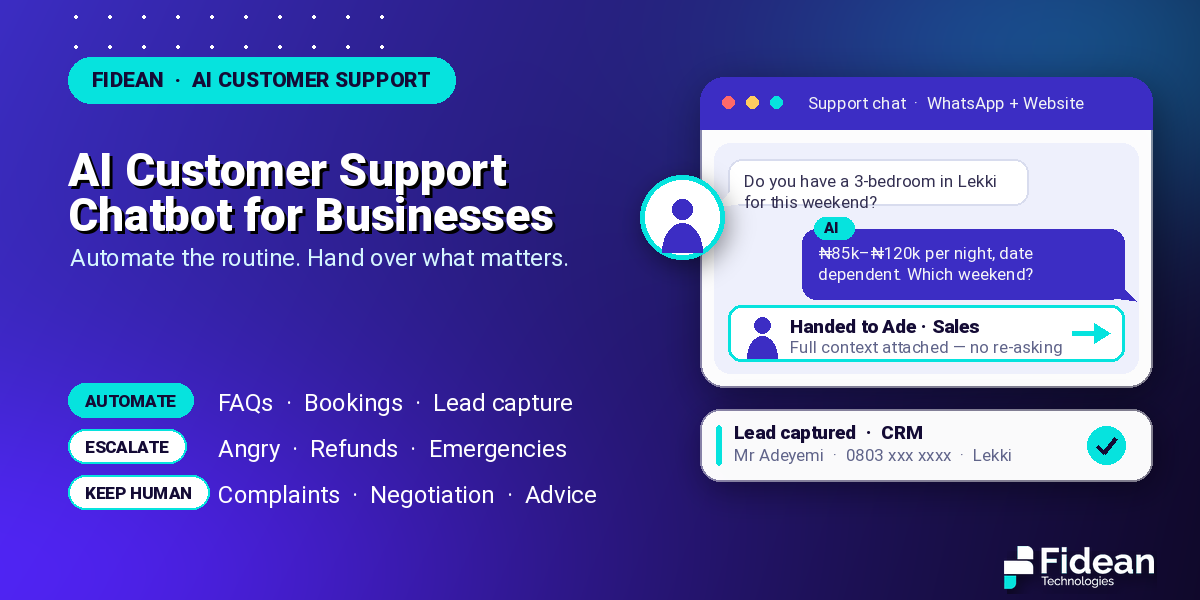
Give the bot ranges and conditions, not quotes. “Our 3-bedroom short-let in Lekki is ₦85,000–₦120,000 per night depending on the date” is a safe answer. “It will be ₦92,500 for you” is a commitment you may not want a bot making at 11 PM.
2. Lead capture and qualification
A chatbot is one of the few pieces of software that asks for contact details at exactly the moment someone wants something. Name, phone number, what they need, how urgent it is, their location, and the best time to call them back — collected in a clean structured format instead of scattered across four chat apps.
This is where the return on investment usually lives. An FAQ bot saves time. A qualifying bot creates pipeline.
3. Appointment and booking intake
Clinics, salons, law firms, driving schools, consultants, repair services. The bot collects the service needed, preferred date and time, location, and any basic requirements, then either offers available slots or sends the booking link. It does not have to be a full scheduler on day one — even an intake form that arrives pre-filled and organised is a big upgrade over a thread of “when are you free?” messages.
4. Sending the right link at the right moment
Price list, catalogue, service page, application form, payment link, proposal, directions on Maps. A surprising share of support work is just link delivery, and a bot never forgets to attach the PDF.
5. Escalation triggers — the most important automation of all
The bot's job is not to keep every conversation. It is to recognise when it must stop. Build explicit triggers for:
- An angry or abusive customer — hand over immediately, no clever responses.
- Anything about a refund, chargeback, or payment dispute.
- Emergencies or time-critical safety issues.
- Anything financial, medical, or legal that requires professional judgement.
- Technical failures that need someone to actually investigate.
- A high-value lead — a corporate enquiry, a bulk order, a contract-sized deal.
- Straight uncertainty: the bot does not know the answer, or two answers conflict.
That last one gets skipped most often and causes the most damage. A bot that guesses is worse than a bot that says “I don't want to give you a wrong answer — let me get a colleague on this.” Write that fallback message yourself. Do not let the model improvise it.
What should stay human — and why that protects your brand
Some conversations are not support tasks. They are relationship moments, and if you hand them to software, customers feel it instantly.
Keep human:
- Complaints and service failures. An apology from a machine reads as an insult, especially when the customer is already upset.
- Payment disputes and refunds. Real money, real accountability, real consequences if mishandled.
- Medical, legal, and financial advice. Your licence and your liability live here. No exceptions.
- Custom pricing, discounts, and negotiation. Only a person who knows your margins should be moving your numbers.
- Sensitive relationship issues. Escalations from existing clients, contract concerns, anything where tone matters more than speed.
The over-automation trap. The classic failure looks like this: a customer asks whether you can deliver to Kaduna before Friday. The bot, trained on a page that mentions nationwide delivery, confidently says yes. Nobody checks. The customer pays. Friday comes and the item is still in Lagos. You did not save a support ticket — you created a refund, a bad review, and a customer who now tells everyone that your business lies.
The second trap is tone. A wall of perfectly smooth, slightly-too-enthusiastic replies to an angry customer makes a business feel fake. Human handover is not a limitation of chatbot technology. It is a trust feature. Customers relax when they can see that a real person has stepped in, and it is often the moment they decide you are a serious business.
How a proper handover works. The value is in what the human receives, not just that they receive it. A clean handover looks like this:
- Customer asks: “How much for a full house fumigation in Ajah, and can you come Saturday?”
- Bot answers the range and the timing question, then collects: name, phone, address area, size of property, preferred time.
- Customer's message turns negative — “this is the third time I'm asking” — or the property is a large commercial site. Either way, an escalation trigger fires.
- Sales gets a summary, not a transcript: Name, phone, Ajah, 4-bedroom duplex + office, wants Saturday morning, asked twice already, price-sensitive. Flagged as frustrated — handle with care.
- The human opens with real context: “Good evening Mr Adeyemi, I can see you're looking at a Saturday morning fumigation in Ajah — let me confirm the slot for you.”
No re-asking. The customer feels heard, the staff member feels equipped, and the business looks organised. That summary step is where most chatbot projects fail: they automate the first reply and leave the human to start from zero — only marginally better than no bot at all.
Channels and setup: website chat, WhatsApp, Messenger, and your CRM
Where the bot lives changes what it can safely do.
Website chatbot. Best for visitors who arrive from Google, an ad, or a proposal link and have a specific question before they fill a form. It catches the people who would otherwise bounce, and because they are already on your site you can send them straight to a relevant page, a service description, or a booking form.
WhatsApp chatbot. The highest-volume channel for most Nigerian and West African businesses, and the one customers trust most. Two things matter here. First, a business-initiated WhatsApp message needs an approved template; free-form text only works inside the 24-hour customer service window opened by the customer's own message. Second, opt-out handling is not optional — give people a clear way to stop receiving messages, and honour it immediately. We covered the plumbing in detail in our guide to WhatsApp Business API for Nigerian businesses.
Messenger and Instagram. Useful when you are running ads, because the enquiry arrives seconds after the click. These conversations are shorter and more visual, so the bot's job is usually qualify-and-route: capture the phone number fast, then move the conversation to WhatsApp or a call.
The official API, not the workaround. Unofficial tools that drive a personal WhatsApp account through the app's back door put that number at risk of being blocked — sometimes permanently, and usually after you have printed it on flyers. If your WhatsApp number is your main line, that is not a shortcut. Use the official API.
CRM integration — or the whole thing leaks. A chatbot without a destination is a very efficient way to lose leads. Every qualified enquiry should become a record: name, phone, source, need, status, assigned staff member, next follow-up date. Otherwise you have simply moved the same problem from a cluttered inbox to a tidier chatbot dashboard, and nobody follows up. If your WhatsApp enquiries are already running through a structured system, extend that instead of adding a parallel one — the workflow in our WhatsApp CRM guide transfers directly.
How to launch without frustrating your customers
Step 1: Start with the questions you actually get. Pull the last 200 messages across WhatsApp, Instagram, Facebook, email, and the website form. Cluster them. You will find that 20 to 50 questions cover most of the volume. That cluster is your knowledge base on day one. Not your brochure. Your inbox.
Step 2: Write the answers in your own voice. Short sentences. Nigerian business reality. If a range depends on something, say so. If you cannot promise a timeline, do not let the bot promise it. Then write the fallback line and the “I am handing you to a colleague” line — in your words, not the model's.
Step 3: Set the handover rules before you switch anything on. Who receives escalations, on which channel, within what time, and what happens when they are offline. A handover rule that only works during office hours is half a rule — decide what the bot says at 10 PM on a Sunday and make sure it is true.
Step 4: Test with your own staff pretending to be difficult. Ask them to be rude, vague, repetitive, and slightly unreasonable. That is where you find the broken answers, the contradictions, and the places where the bot wants to promise things it should not. Fix those before a real customer finds them.
Step 5: Measure what matters, monthly. Response time on first reply. Percentage of conversations resolved without a human. Number of handovers. Leads captured and how many were contacted within an hour. Missed or unknown questions — this list is your improvement backlog. Customer complaints that mention the bot specifically. If the last number is climbing, your automation line is in the wrong place.
Step 6: Improve the list, not the personality. Nine out of ten chatbot failures are knowledge failures dressed up as technology failures. Keep adding the questions the bot could not answer — charming phrasing will not fix a missing answer.
What realistic results look like. Well-scoped support bots handle most routine FAQ traffic, cut first-response time from hours to seconds, and increase qualified, contactable leads, because details get collected instead of lost. They do not reduce your headcount — they let the same team handle a larger volume without hiring again. Treat that as the target.
Building the support workflow properly
Getting the automation line right is a design decision, not a technical one. It depends on your margins, your channels, your industry rules, and what your customers actually complain about.
At Fidean, we build this end to end: collecting and clustering your real customer questions, writing the answers and fallback rules, connecting WhatsApp (official API), website chat and Messenger, wiring the handover into a CRM so every enquiry becomes a tracked lead, and building the reporting that shows you whether support is actually improving or just sounding busier.
A bot should be your front desk assistant. Never your overconfident cousin with data bundles.
If you want a realistic read on what is safe to automate in your business, book an AI support workflow audit — we will map your top questions, your escalation triggers, and your handover rules before anyone writes a line of configuration. For a specific question about WhatsApp, chatbot integration, or CRM setup, our support page is the fastest route.